Just like every other JavaScript Object, Arrays have quite a number of methods. In JavaScript, unlike other languages, Arrays are not primitives (don’t know what this means? take a look at my past article about Data Types in JavaScript) instead, they are defined as Array objects with the following characteristics:
- They are resizable and can contain a mix of different data types.
- They are non-associative arrays, meaning that their elements can’t be accessed using arbitrary strings as indexes (like hash maps) instead they must be accessed through their non-negative integer as an index.
- They are Zero Indexed, meaning that the first element will always be at index 0, and that the last element of it will always be the value of the length property minus 1.
- Any array-copy operation will create a shallow copy, meaning that the copy will share the same reference as its original source. As a result, any change to the copy will effectively reflect in the original source too.
Now, I know this might be a bit too much to digest if you’re new to this, but trust me it will make sense soon.
What Are Arrays?
Now that we went over the documentation version of what they are, let’s try to break it down to an easier way.
Arrays are, essentially, a special type of Object that is used to store an ordered collection of elements under the same variable name. They use a zero-based index (meaning the index starts with 0) and this index is used to access any of the elements in the array.
Arrays have, as I mentioned at the beginning, a large number of methods which are built-in, optimized functions that help us manipulate, transform, and traverse the data within these objects. This helps us perform operations with the data stored in arrays in a more performant way that what we saw in the past article Understanding Loops.
💡 In this article we’re only covering the core, most basic Methods, but we’ll be going through more advanced Methods in the next one.
Mutating vs. Non‑Mutating Methods
Okay, so we’ve explained that we have 2 types of methods. The mutating methods, which change the original array in place, and the non-mutating methods which leave the original array untouched.
This distinction is quite important to writing maintainable code, especially in modern environments like React, where data mutability is really important for state management.
Traversal / Iteration Methods
Array.prototype.forEach() This is the simplest traversal method for arrays in JavaScript. It allows us to go through all elements of an array and run a function on them.
const fruits = ['apple','banana','cherry'];

fruits.forEach((fruit, index) => {
	console.log(`Index ${index}: ${fruit}`);
});
Of course, this is a method for arrays only but as we saw in the past article we can also opt for using for… of which will do essentially the same.
Adding / Removing Items
Alright, as we established at the beginning, arrays are essentially collections of data under the same variable, but how do we manipulate this data? Let’s go through the core methods.
Push
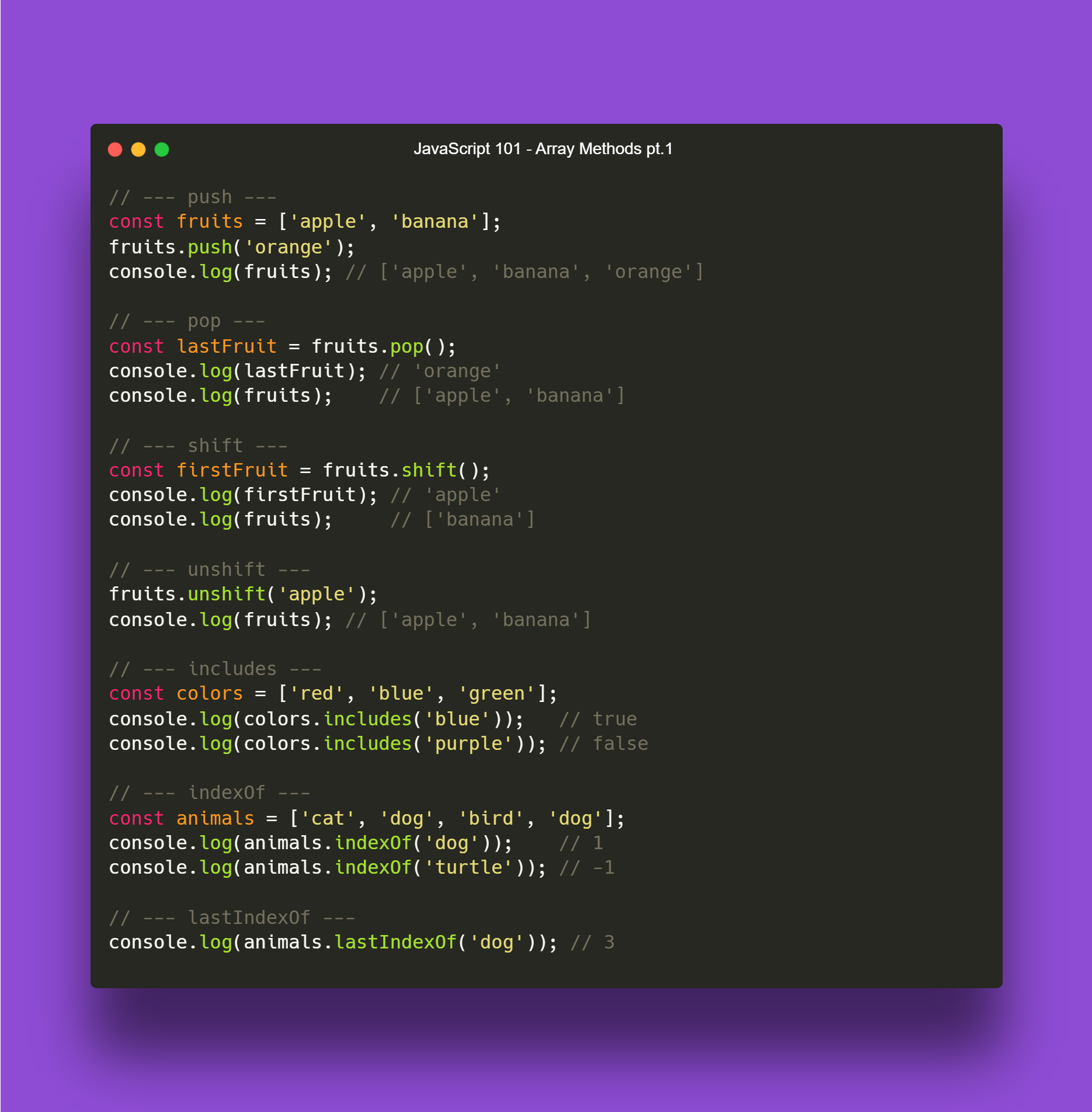
We use the Push method in order to add new elements to the end of an array.
const fruits = ['apple', 'banana'];

fruits.push('orange');
console.log(fruits); // ['apple', 'banana', 'orange']
Pop
We use the Pop method to remove the last element from an array.
const fruits = ['apple', 'banana', 'orange'];

const lastFruit = fruits.pop();

console.log(lastFruit); // 'orange'
console.log(fruits);    // ['apple', 'banana']
Shift
The Shift method is used to remove the first element of an array.
const fruits = ['apple', 'banana', 'orange'];

const firstFruit = fruits.shift();

console.log(firstFruit); // 'apple'
console.log(fruits);     // ['banana', 'orange']
Unshift
Similar to Push, we use Unshift to add a new item to an array, but at the front of it.
const fruits = ['banana', 'orange'];

fruits.unshift('apple');
console.log(fruits); // ['apple', 'banana', 'orange']
Finding Items
Now you know how to modify arrays in order to store or extract information on them. Remember that arrays are one of the most used data structures out there, so if you are pursuing Software Development as a career, you must be familiar with them.
For the next block of Methods we’ll talk about different ways to find specific elements, the following methods are used to solve this task specifically.
includes
The Includes method is used to see if a value exists in an array, it returns true or false accordingly.
const colors = ['red', 'blue', 'green'];

console.log(colors.includes('blue'));   // true
console.log(colors.includes('purple')); // false
indexOf
The indexOf method is a bit different, this gives us the numerical index of the element we are looking for, it will also return a negative integer ( -1 ) if it doesn’t find the element in the array.
const animals = ['cat', 'dog', 'bird', 'dog'];

console.log(animals.indexOf('dog'));    // 1
console.log(animals.indexOf('turtle')); // -1
lastIndexOf
And finally, the lastIndexOf, for this I’ll give a small explanation about arrays, as explained before, arrays are a collection of values under the same variable name, meaning that we can store the same value multiple times without an issue as the values will be indexed in a different numerical index.
The lastIndexOf returns the numerical index of the last time the element we’re looking for is in the array, so if it is there 3 times, it will return the index of the third reviewing the values from left to right when printed.
const animals = ['cat', 'dog', 'bird', 'dog'];
console.log(animals.lastIndexOf('dog')); // 3
In a nutshell
Array Methods PT 1
Up Next
And that’s it for this article!
in the next one we’ll be diving deeper into Array Methods exploring more advanced methods like map, filter, reduce, sort and more!